Can You Use GoHighLevel for Different Clients? Complete Guide

Managing different clients at the same time can feel a bit stressful. Each one needs something unique. And between different tasks, messages, and timelines, it is easy to get things mixed up.
GoHighLevel is an all-in-one tool that helps you keep everything in one place. But can you use GoHighLevel for different clients and stay organized?
The simple answer is yes. And not just yes; it works really well.
In this post, we will discuss how GoHighLevel helps manage multiple clients and share some best strategies as well.
Still confused and never signed up for GoHighLevel yet? Sign up on this page and get an extended 30-day trial
Some important things to keep in mind:
How to Set Up GoHighLevel for Multiple Clients?
Once you sign up, getting started is pretty simple. There is no need to be a tech expert or take hours to figure things out.
GoHighLevel provides you with all the tools you need to make your clients more organized and your systems more effective. Here is how to set it up:
Create Your Main Agency Account
This is your control center. From here, you can see all your clients, manage settings, and switch between accounts. Everything starts here.
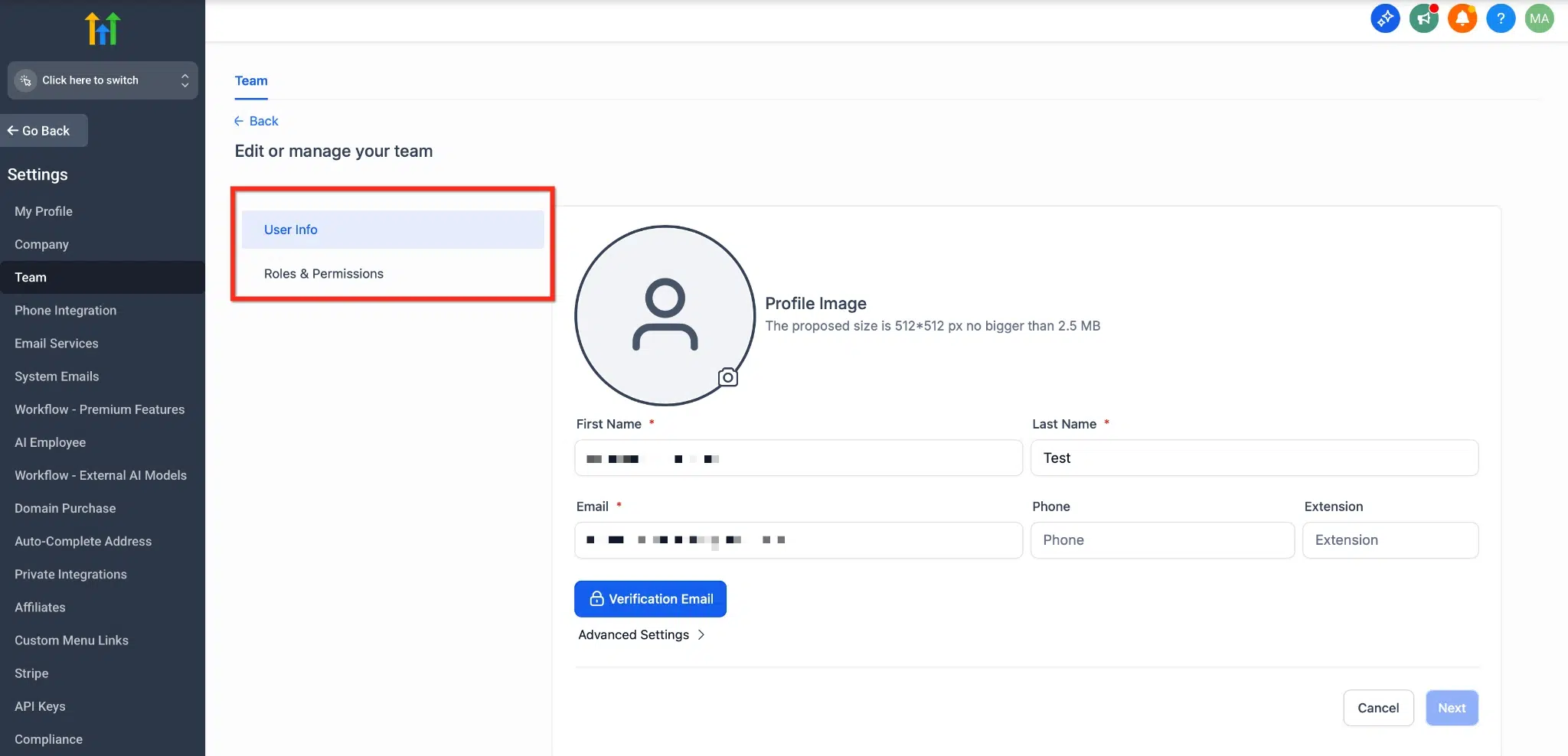
Add a New Team Member
- Go to Settings in the left menu (make sure you’re in Agency View).
- Click Team.
- From here you can add a new user, edit one, or remove one.
When you add or edit a user, you can set:
User type: pick one.
Each client gets their own sub-account. This keeps their data, tools, and automations completely separate.
You can either start from scratch or use a snapshot (a saved setup you already built).
This is particularly helpful when you offer the same service across clients like real estate, salons, or coaches.
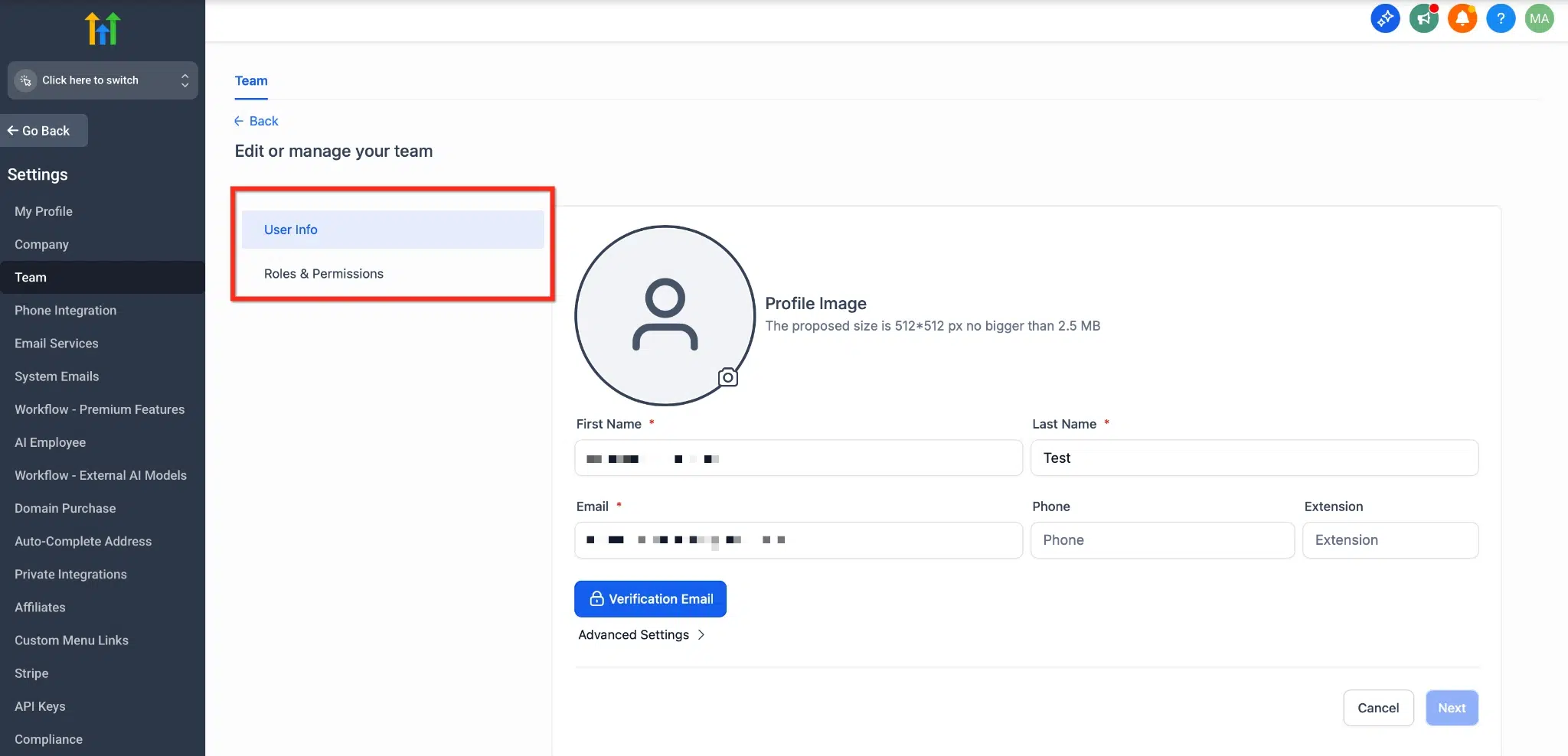
Login As Permission
This lets an admin log in as another user’s account. However, it will only work if the admin has first enabled it for that person. If it’s off, then it won’t appear at all.
You will find this setting here: Agency Settings > Team > Edit User > Roles & Permissions > User Management
Set Up Funnels, Forms, and Workflows
Within each client account, you can:
- Build sales funnels
- Create forms and surveys
- Set up follow-up with email or SMS.
- Set up a booking calendar
You don’t need to code anything; it is drag and drop. Simply select what your client requires and build away!
Launch and See How It is Working
Once everything is set, go live. You can test forms, check automations, and tweak anything that needs adjustment. After one account is working well, you can build a snapshot around it.
Ready to Try GoHighLevel for Your Clients?
If you want to manage all your clients from one place and deliver real results, GoHighLevel is built for you. No need to switch between different tools.
Pro Tip
During your 30-day free trial, you can test this dashboard by adding one client and walking through the process without pressure.
Agency Account vs. Sub-Account: How Do They Work Together for Different Clients?
People mix these two terms a lot, so let’s keep it simple.
Your Agency Account is your main login. It’s the one place you use to see all your clients, handle billing, and switch between accounts. You only get one of these, no matter how many clients you have.
A Sub-Account is a separate workspace inside your agency account. Every client gets one. Sub-accounts have their own CRM, funnels, contacts, calendars, workflows, and chats. If your client does not copy something into another sub-account, it will not appear in that other sub-account.
There’s also something called an Agency Sub-Account. This is just a sub-account you set up for yourself instead of a client, usually to run your own business or manage your SaaS billing setup.
When creating a new sub-account, GoHighLevel will ask whether you’re creating a sub-account for a client or your own business. This is where this option comes in.
How Many Clients Can You Handle?
This is something most guides miss; you should know it if you are going to sign up clients.
| Plan | Sub-Account Limit |
| Starter | 3 sub-accounts |
| Unlimited | No cap |
| Agency Pro / SaaS | No cap, plus rebilling and SaaS mode features |
On the Starter plan, you get 3 sub-accounts and can divide them however you like. That could mean three clients, or two clients and one for your own business. If you’re planning to take on more than a couple of clients, go with the Unlimited plan.
Billing is simple. You pay GoHighLevel one monthly fee, and on plans that support it, adding a sub-account doesn’t cost anything extra.
Read this: GoHighLevel for Personal Trainers: Complete Breakdown + Key Benefits
How Does GoHighLevel Help You Manage Multiple Clients?
GoHighLevel is a multifunctional tool. It’s designed for individuals who require a basic solution to handle several clients and remain on top of matters. Here’s what makes it great:
No More Building Things from Scratch
After you create a funnel, form, or workflow for one client, you can save it as a snapshot and reuse it for another client.
Just copy and edit it for your next project. This saves you hours every week.
Control Who Sees What
GoHighLevel lets you add users and set permissions. That means clients only see their own data, and your team can access just what they need.
Add Your Own Branding
You can use your agency logo, colors, and even a custom domain. Your clients will see your name instead of GoHighLevel branding. It makes you look professional and builds trust.
One login, Full Control
Even if you manage ten or twenty clients, you still log in once and see everything from one main dashboard. You can switch between client accounts in seconds and keep track of everything going on.
Read this: GoHighLevel for Credit Repair: Key Features + Setup Guide
Pro Tip
Run A/B tests on your funnels and emails regularly. Even small changes like a headline or button color can double conversions.
Conclusion
So yes, you can absolutely use GoHighLevel for different clients, and it’s built to make that easy rather than messy. Every client’s data, funnels, and workflows are contained in a separate sub-account; snapshots save you from rebuilding the same setup over and over again, and one login means one place to manage all without the hassle of multiple tools.
Start working with one client, learn the fundamentals, and accelerate all subsequent clients based on that knowledge. That’s what most agencies end up doing, and that’s a pretty good way of running several clients from one account.
Claim your 30-day free trial today and get a bonus 30-minute consultation to help you set up your first client the right way.